Complete Integration Code
Full system code combining all components.
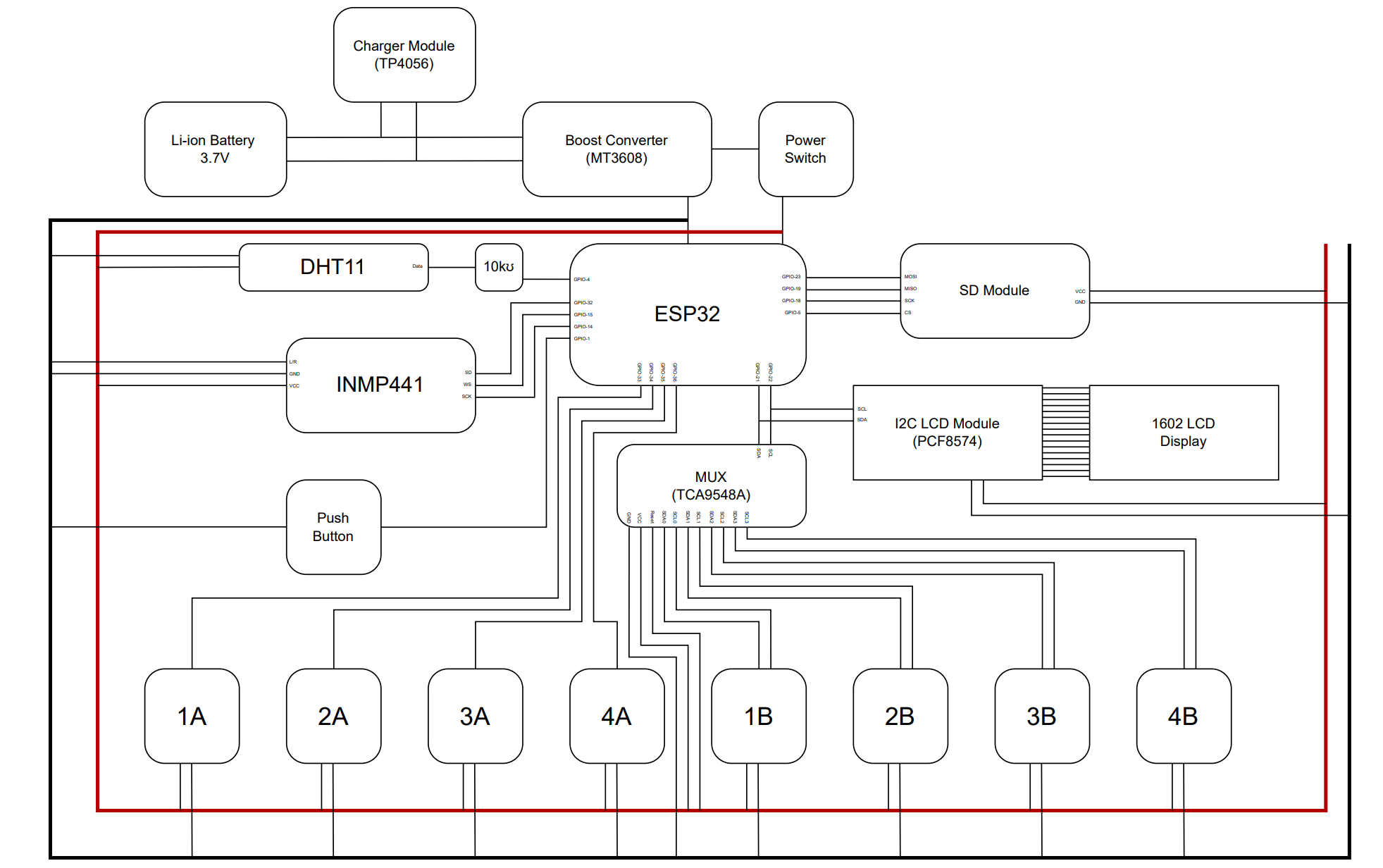
Overview
This code integrates: - All sensors (temperature, humidity, vibration, acoustic) - LCD and TFT displays - WiFi connectivity - MQTT cloud transmission - Error handling
Required Libraries
#include "secrets.h"
#include <Wire.h>
#include <LiquidCrystal_PCF8574.h>
#include <I2Cdev.h>
#include <MPU6050.h>
#include <WiFiManager.h>
#include <WiFiClientSecure.h>
#include <WiFiClient.h>
#include <PubSubClient.h>
#include <HTTPClient.h>
#include <WiFiUdp.h>
#include <coap-simple.h>
#include <ArduinoJson.h>
#include <DHT.h>
#include <SPI.h>
#include <SD.h>
#include <time.h>

// ==========================================
// *** MASTER CONFIGURATION ***
// ==========================================

/**
 * PROTOCOL_MODE: Select the communication protocol
 * 0 = MQTT (Standard Pub/Sub)
 * 1 = HTTP (RESTful POST)
 * 2 = CoAP (UDP-based Constrained Application Protocol)
 */
#define PROTOCOL_MODE 2

/**
 * USE_SECURITY: Toggle connection security
 * 1 = SECURE MODE (SSL/TLS enabled)
 *     Required for AWS IoT Core. Uses certificate-based mTLS.
 * 0 = UNSECURE MODE (Plaintext communication)
 *     Used for local Mosquitto, Node-RED, or local CoAP/HTTP servers.
 */
#define USE_SECURITY  0

// Generic IP used for ALL local protocols (MQTT, HTTP, CoAP)
const char* LOCAL_SERVER_IP = "192.168.100.4";

// --- CoAP STABILITY CONFIG ---
const int COAP_PORT = 5685; // Default CoAP is 5683; used 5685 for local testing
// ==========================================

#define DHTPIN        14
#define DHTTYPE       DHT22
#define SD_CS         5
#define RESET_PIN     0
#define LCD_ADDR      0x27
#define MPU_ADDR      0x68

LiquidCrystal_PCF8574 lcd(LCD_ADDR);
MPU6050 mpu(MPU_ADDR);

// Networking Clients
WiFiClient netLocal;
WiFiClientSecure netSecure;
PubSubClient client;
WiFiUDP udp;
Coap coap(udp);
DHT dht(DHTPIN, DHTTYPE);
WiFiManager wm;

unsigned long lastMillis = 0;
bool mpuAlive = false;

// --- LCD HELPER ---
void updateLCD(String l1, String l2) {
  lcd.clear();
  lcd.setCursor(0,0); lcd.print(l1);
  lcd.setCursor(0,1); lcd.print(l2);
}

// --- SECURE TIME SYNC ---
void syncTime() {
  configTime(0, 0, "pool.ntp.org", "time.nist.gov");
  time_t now = time(nullptr);
  while (now < 8 * 3600 * 2) { delay(500); now = time(nullptr); }
  Serial.println("Time Synced!");
}

// --- MQTT LOGIC ---
void connectMQTT() {
  if (client.connect(THINGNAME)) {
    Serial.println("MQTT Connected");
    updateLCD("MQTT Connected", USE_SECURITY ? "SECURE (AWS)" : "LOCAL (IP)");
  } else {
    Serial.printf("MQTT Fail, rc=%d\n", client.state());
  }
}

// --- HTTP LOGIC ---
void publishHTTP(String payload) {
  HTTPClient http;
  String url;

  if (USE_SECURITY) {
    url = "https://" + String(AWS_IOT_ENDPOINT) + ":8443/topics/esp32/pub?qos=1";
    http.begin(netSecure, url);
  } else {
    url = "http://" + String(LOCAL_SERVER_IP) + ":1880/telemetry";
    http.begin(netLocal, url);
  }

  int httpCode = http.POST(payload);
  Serial.printf("HTTP Code: %d\n", httpCode);
  http.end();
}

// --- CoAP LOGIC (Stabilized) ---
// Note: We provide a callback to handle server responses (ACKs).
// This prevents the ESP32 from panicking if the server doesn't respond instantly.
void coapResponseCallback(CoapPacket &packet, IPAddress ip, int port) {
  Serial.print("CoAP Server ACK received! Status: ");
  Serial.println(packet.code);
}

void publishCoAP(String payload) {
  if (payload.length() == 0) return;

  IPAddress serverIP;
  if (serverIP.fromString(LOCAL_SERVER_IP)) {
    Serial.printf("Sending CoAP to %s:%d\n", LOCAL_SERVER_IP, COAP_PORT);
    // Use the explicit length to ensure a clean packet
    uint16_t msgid = coap.put(serverIP, COAP_PORT, "telemetry", payload.c_str(), payload.length());
    if (msgid > 0) Serial.println("CoAP Sent successfully.");
  } else {
    Serial.println("Invalid CoAP Server IP!");
  }
}

void setup() {
  Serial.begin(9600);
  Wire.begin(21, 22);
  lcd.begin(16, 2);
  lcd.setBacklight(255);

  dht.begin();
  mpu.initialize();
  mpuAlive = mpu.testConnection();
  SD.begin(SD_CS);

  if (!wm.autoConnect("CyberGaar_Node_AP")) { ESP.restart(); }

  // Security Switch
  if (USE_SECURITY && PROTOCOL_MODE < 2) {
    syncTime();
    netSecure.setCACert(AWS_CERT_CA);
    netSecure.setCertificate(AWS_CERT_CRT);
    netSecure.setPrivateKey(AWS_CERT_PRIVATE);

    client.setClient(netSecure);
    client.setServer(AWS_IOT_ENDPOINT, 8883);
  } else {
    // Both Insecure MQTT and CoAP use this branch
    client.setClient(netLocal);
    client.setServer(LOCAL_SERVER_IP, 1883);
  }

  // Protocol specific startup
  if (PROTOCOL_MODE == 0) {
    connectMQTT();
  } else if (PROTOCOL_MODE == 2) {
    coap.response(coapResponseCallback);
    coap.start();
  }

  updateLCD("CYBERGAAR NODE", USE_SECURITY ? "SECURE MODE" : "LOCAL MODE");
}

void loop() {
  if (PROTOCOL_MODE == 0) {
    if (!client.connected()) connectMQTT();
    client.loop();
  } else if (PROTOCOL_MODE == 2) {
    coap.loop();
  }

  if (millis() - lastMillis > 5000) {
    lastMillis = millis();

    float h = dht.readHumidity();
    float t = dht.readTemperature();
    int16_t ax, ay, az;
    float accelX = 0;
    if (mpuAlive) { mpu.getAcceleration(&ax, &ay, &az); accelX = ax / 16384.0; }

    StaticJsonDocument<256> doc;
    doc["t"] = t; doc["h"] = h; doc["ax"] = accelX;

    char buffer[256];
    serializeJson(doc, buffer);

    if (PROTOCOL_MODE == 0) client.publish("esp32/pub", buffer);
    else if (PROTOCOL_MODE == 1) publishHTTP(String(buffer));
    else if (PROTOCOL_MODE == 2) publishCoAP(String(buffer));

    lcd.clear();
    lcd.setCursor(0,0); lcd.printf("T:%.1f H:%.0f", t, h);
    lcd.setCursor(0,1); lcd.printf("%s P:%d", USE_SECURITY ? "SEC" : "LOC", PROTOCOL_MODE);
  }
}
Code Structure
Setup Phase
- Initialize Serial
- Initialize I2C
- Initialize sensors
- Connect WiFi
- Setup MQTT
Main Loop
- Check WiFi connection
- Check MQTT connection
- Read sensors (every 5s)
- Update display (every 1s)
- Send MQTT data (every 10s)
Functions
connectWiFi()- WiFi connection with retryconnectMQTT()- MQTT connection with retryreadSensors()- Read all sensor valuesupdateDisplay()- Update LCD with current valuessendMQTTData()- Publish sensor data via MQTT
Customization
Change Intervals
const unsigned long SENSOR_INTERVAL = 5000;   // 5 seconds
const unsigned long DISPLAY_INTERVAL = 1000;    // 1 second
const unsigned long MQTT_INTERVAL = 10000;      // 10 seconds
Add More Sensors
- Add sensor variable
- Initialize in
setup() - Read in
readSensors() - Add to MQTT payload
Change Topics
Testing
See Testing for verification procedures.