Skip to content

DHT Sensor (Temperature & Humidity)

The temperature and humidity sensors in this toolkit are combined into a single DHT (Digital Humidity and Temperature) sensor module. This means a single physical component provides both sets of data.

DHT11 and DHT22 Sensors

DHT Versions

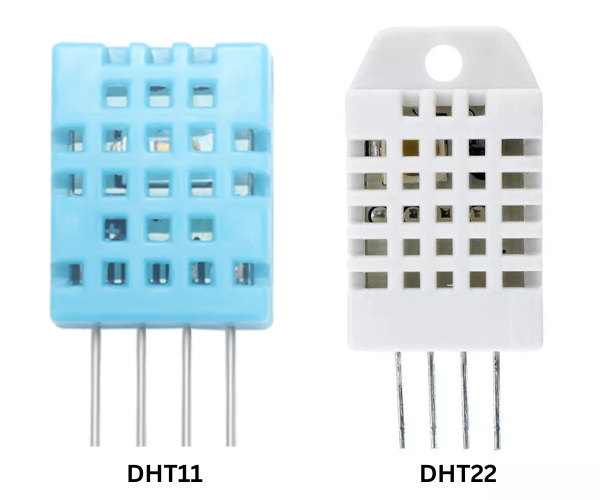
There are two common versions of this sensor: DHT11 (usually blue) and DHT22 (usually white). While they look similar and use the same pinout, they have different performance characteristics:

Feature DHT11 (Blue) DHT22 (White)
Temperature Range 0°C to 50°C -40°C to 80°C
Temperature Accuracy ±2.0°C ±0.5°C
Humidity Range 20% to 80% 0% to 100%
Humidity Accuracy ±5% ±2-5%
Sampling Rate 1 Hz (1 reading/sec) 0.5 Hz (1 reading/2 sec)

Specifications

Parameter Value
Model DHT11 / DHT22
Interface Single-bus Digital
Operating Voltage 3.3V - 5V

Pinout

Pin Function ESP32 Connection
VCC Power 3.3V
DATA Data Output GPIO14 (Recommended)
NC Not Connected -
GND Ground GND

Code Example

#include "DHT.h"

#define DHTPIN 14     // Digital pin connected to the DHT sensor
#define DHTTYPE DHT22   // Change to DHT11 if using the blue version

DHT dht(DHTPIN, DHTTYPE);

void setup() {
  Serial.begin(115200);
  dht.begin();
}

void loop() {
  delay(2000);

  float h = dht.readHumidity();
  float t = dht.readTemperature();

  if (isnan(h) || isnan(t)) {
    Serial.println(F("Failed to read from DHT sensor!"));
    return;
  }

  Serial.print(F("Humidity: "));
  Serial.print(h);
  Serial.print(F("%  Temperature: "));
  Serial.print(t);
  Serial.println(F("°C "));
}

Troubleshooting

Issue Solution
"Failed to read" error Check wiring, ensure correct DHTTYPE is selected, and verify the data pin.
Readings are 0 or NAN Ensure the sensor is powered (3.3V-5V) and the pin is pushed in firmly.
Inaccurate readings Keep away from heat sources; DHT11 has limited accuracy.