LCD (LiquidCrystal I2C)
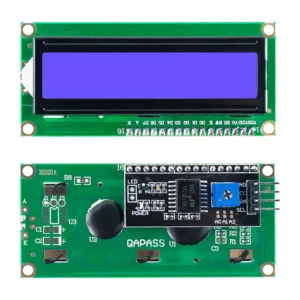
Overview
Character LCD display for simple text output of sensor readings.
Specifications
| Parameter | Value |
|---|---|
| Model | |
| Type | Character LCD |
| Size | 16x2 or 20x4 |
| Interface | I2C |
| Controller | HD44780 compatible |
| Operating Voltage | 5V (with I2C backpack) or 3.3V |
| I2C Address | Typically 0x27 or 0x3F |
Pinout
| Pin | Function | ESP32 Connection |
|---|---|---|
| VCC | Power | 5V or 3.3V |
| GND | Ground | GND |
| SDA | I2C Data | GPIO21 |
| SCL | I2C Clock | GPIO22 |
Wiring Diagram
LCD (with I2C backpack)
       |
       |-- VCC --> 5V (or 3.3V)
       |-- GND --> GND
       |-- SDA --> GPIO21
       |-- SCL --> GPIO22
Required Libraries
Install via Arduino IDE Library Manager.
Code Example
Basic Test
#include <Wire.h>
#include <LiquidCrystal_I2C.h>

// Set I2C address (0x27 or 0x3F depending on your module)
LiquidCrystal_I2C lcd(0x27, 16, 2);

void setup() {
  Serial.begin(115200);

  // Initialize LCD
  lcd.init();
  lcd.backlight();

  // Display welcome message
  lcd.setCursor(0, 0);
  lcd.print("IoT Toolkit");
  lcd.setCursor(0, 1);
  lcd.print("LCD Test OK");

  Serial.println("LCD initialized");
}

void loop() {
  // Update display periodically
  lcd.setCursor(0, 1);
  lcd.print("Time: ");
  lcd.print(millis() / 1000);
  lcd.print("s   ");

  delay(1000);
}
Display Sensor Data
#include <Wire.h>
#include <LiquidCrystal_I2C.h>

LiquidCrystal_I2C lcd(0x27, 16, 2);

// Simulated sensor values
float temperature = 25.5;
float humidity = 60.0;

void setup() {
  lcd.init();
  lcd.backlight();
}

void loop() {
  // Display temperature on line 1
  lcd.setCursor(0, 0);
  lcd.print("T: ");
  lcd.print(temperature, 1);
  lcd.print((char)223); // Degree symbol
  lcd.print("C  ");

  // Display humidity on line 2
  lcd.setCursor(0, 1);
  lcd.print("H: ");
  lcd.print(humidity, 1);
  lcd.print("%    ");

  // TODO: Replace with actual sensor readings

  delay(2000);
}
Testing
I2C Address Detection
Run I2C scanner to find LCD address:
#include <Wire.h>

void setup() {
  Wire.begin();
  Serial.begin(115200);
  Serial.println("\nI2C Scanner");
}

void loop() {
  for (byte address = 1; address < 127; address++) {
    Wire.beginTransmission(address);
    if (Wire.endTransmission() == 0) {
      Serial.print("I2C device at 0x");
      Serial.println(address, HEX);
    }
  }
  delay(5000);
}
Common addresses: - 0x27 (PCF8574T) - 0x3F (PCF8574AT)
Troubleshooting
| Issue | Solution |
|---|---|
| Blank screen | Check I2C address, verify contrast potentiometer |
| I2C not detected | Check wiring, verify 4.7kΩ pull-up resistors |
| Garbled text | Check initialization sequence, verify power |
| Backlight not working | Check power connections |
| Wrong characters | Verify correct I2C address |
Custom Characters
// Create custom degree symbol
byte degree[8] = {
  B00110,
  B01001,
  B01001,
  B00110,
  B00000,
  B00000,
  B00000,
  B00000
};

void setup() {
  lcd.init();
  lcd.createChar(0, degree);
  lcd.setCursor(0, 0);
  lcd.print("25");
  lcd.write(0); // Custom degree symbol
  lcd.print("C");
}
Next Steps
- Set up TFT Display for advanced graphics
- Integrate with sensor data
- Proceed to full integration